↓ 전체 코드
더보기
033_Eis/MainWindow.xaml
<Window x:Class="_033_Eis.MainWindow"
        xmlns="http://schemas.microsoft.com/winfx/2006/xaml/presentation"
        xmlns:x="http://schemas.microsoft.com/winfx/2006/xaml"
        xmlns:d="http://schemas.microsoft.com/expression/blend/2008"
        xmlns:mc="http://schemas.openxmlformats.org/markup-compatibility/2006"
        xmlns:local="clr-namespace:_033_Eis"
        mc:Ignorable="d"
        Title="MainWindow" Height="530" Width="900"
        Background="AliceBlue">
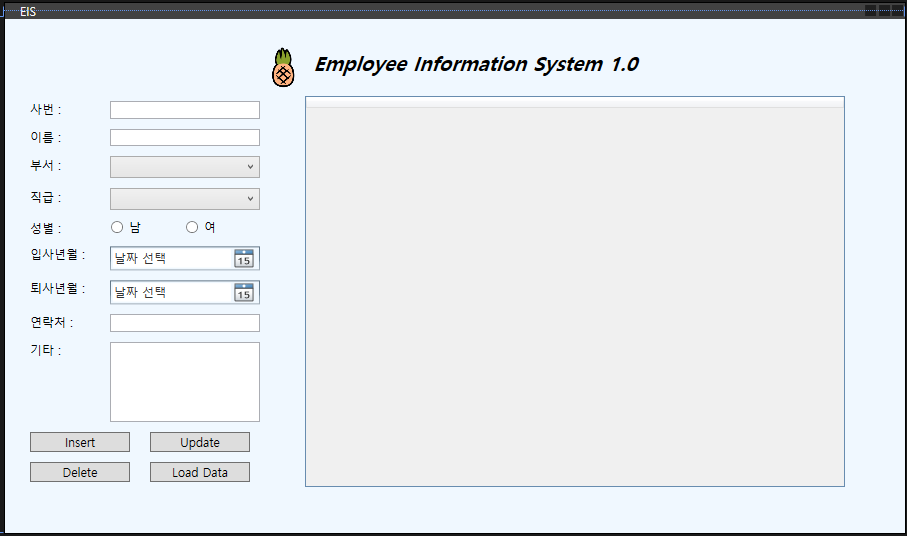
    <StackPanel
        Margin="20">
        <StackPanel Orientation="Horizontal"
                    HorizontalAlignment="Center"
                    Margin="0 0 0 10">
            <Image Source="Images/sql_logo.png"
                   Width="32" Height="32">
            </Image>
            <TextBlock
                FontSize="30"
                Margin="20 0 0 0">
            Employee Information System 1.0
            </TextBlock>
        </StackPanel>
        <StackPanel Orientation="Horizontal">
            <StackPanel>
                <!--11개가 있다-->
                <StackPanel
                    Orientation="Horizontal"
                    Margin="5">
                    <TextBlock
                        Width="80">사번 :</TextBlock>
                    <TextBox x:Name="txt_Eid"
                        Width="150"></TextBox>
                </StackPanel>
                <StackPanel
                    Orientation="Horizontal"
                    Margin="5">
                    <TextBlock
                        Width="80">이름 :</TextBlock>
                    <TextBox x:Name="txt_name"
                        Width="150"></TextBox>
                </StackPanel>
                <StackPanel
                    Orientation="Horizontal"
                    Margin="5">
                    <TextBlock
                        Width="80">부서 :</TextBlock>
                    <ComboBox x:Name="cb_dept"
                        Width="150">
                        <ComboBoxItem>개발팀</ComboBoxItem>
                        <ComboBoxItem>마케팅팀</ComboBoxItem>
                        <ComboBoxItem>기획팀</ComboBoxItem>
                        <ComboBoxItem>총무팀</ComboBoxItem>
                        <ComboBoxItem>해외개발팀</ComboBoxItem>
                    </ComboBox>
                </StackPanel>
                <StackPanel
                    Orientation="Horizontal"
                    Margin="5">
                    <TextBlock
                        Width="80">직급 :</TextBlock>
                    <ComboBox x:Name="cb_pos"
                        Width="150">
                        <ComboBoxItem>이사</ComboBoxItem>
                        <ComboBoxItem>부장</ComboBoxItem>
                        <ComboBoxItem>과장</ComboBoxItem>
                        <ComboBoxItem>팀장</ComboBoxItem>
                        <ComboBoxItem>대리</ComboBoxItem>
                        <ComboBoxItem>사원</ComboBoxItem>
                    </ComboBox>
                </StackPanel>
                <StackPanel
                    Orientation="Horizontal"
                    Margin="5">
                    <TextBlock
                        Width="80">성별 :</TextBlock>
                    <RadioButton x:Name="rb_male"
                                 Width="50" >남</RadioButton>
                    <RadioButton x:Name="rb_female"
                                 Width="50" >여</RadioButton>
                </StackPanel>
                <StackPanel
                    Orientation="Horizontal"
                    Margin="5">
                    <TextBlock
                        Width="80">입사일 :</TextBlock>
                    <DatePicker x:Name="dp_enter"
                        Width="150"></DatePicker>
                </StackPanel>
                <StackPanel
                    Orientation="Horizontal"
                    Margin="5">
                    <TextBlock
                        Width="80">퇴사일 :</TextBlock>
                    <DatePicker x:Name="dp_exit"
                        Width="150"></DatePicker>
                </StackPanel>
                <StackPanel
                    Orientation="Horizontal"
                    Margin="5">
                    <TextBlock
                        Width="80">연락처 :</TextBlock>
                    <TextBox x:Name="txt_contact"
                        Width="150"></TextBox>
                </StackPanel>
                <StackPanel
                    Orientation="Horizontal"
                    Margin="5">
                    <TextBlock
                        Width="80">기타 :
                    </TextBlock>
                    <TextBox x:Name="txt_comment"
                        Width="150" Height="80"
                        AcceptsTab="True"
                        TextWrapping="Wrap"
                        VerticalScrollBarVisibility="Auto">
                    </TextBox>
                </StackPanel>
                <StackPanel
                    Orientation="Horizontal"
                    HorizontalAlignment="Center"
                    Margin="5">
                    <Button x:Name="btn_insert"
                            Width="80"
                            Click="btn_insert_Click"
                            >Insert</Button>
                    <TextBlock Width="20"></TextBlock>
                    <Button x:Name="btn_update"
                            Click="btn_update_Click"
                        Width="80">Update</Button>
                </StackPanel>
                <StackPanel
                    Orientation="Horizontal"
                    HorizontalAlignment="Center"
                    Margin="5">
                    <Button x:Name="btn_delete"
                        Width="80" Click="btn_delete_Click">Delete</Button>
                    <TextBlock Width="20"></TextBlock>
                    <Button x:Name="btn_LoadData"
                            Click="btn_load_data_clicked"
                        Width="80">Load Data</Button>
                </StackPanel>
            </StackPanel>
            <DataGrid x:Name="data_grid"
                      Margin="5"
                      Width="540"
                      SelectionChanged="data_grid_SelectionChanged">
            </DataGrid>
        </StackPanel>
    </StackPanel>
</Window>
033_Eis/MainWindow.xaml.cs
using MySql.Data.MySqlClient;
using System;
using System.Data;
using System.Windows;
using System.Windows.Controls;

namespace _033_Eis
{
    public partial class MainWindow : Window
    {
        string pos = ""; //직급
        string dept = ""; //부서
        string gender = ""; //성별
        string dateEnter = ""; //입사일
        string dateExit = ""; //퇴사일
        private string connStr = "server=localhost; user id=root; " +
            "password=1234; database=eis_db2";
        private MySqlConnection conn;
        public MainWindow()
        {
            InitializeComponent();
            conn = new MySqlConnection(connStr);
            DisplayDataGrid();
        }

        private void btn_insert_Click(object sender, RoutedEventArgs e)
        {
            //성별
            if (rb_male.IsChecked == true)
                gender = "남성";
            else if (rb_female.IsChecked == true)
                gender = "여성";
            //입사일
            if (dp_enter.SelectedDate != null)
                dateEnter = dp_enter.SelectedDate.Value.Date.ToShortDateString();
            //퇴사일
            if (dp_exit.SelectedDate != null)
                dateExit = dp_exit.SelectedDate.Value.Date.ToShortDateString();
            else
                dateExit = DateTime.MaxValue.ToShortDateString();

            //부서, 직급
            dept = cb_dept.Text;
            pos = cb_pos.Text;
            try
            {
                conn.Open();
                string sql = string.Format("INSERT INTO eis_table (name, department, " +
                    "position, gender, data_enter, data_exit, contact, comment) " +
                    "VALUES ('{0}','{1}','{2}','{3}','{4}','{5}','{6}','{7}')",
                    txt_name.Text, dept, pos, gender, dateEnter, dateExit, txt_contact.Text, txt_comment.Text);
                MySqlCommand cmd = new MySqlCommand(sql, conn);
                if (cmd.ExecuteNonQuery() == 1)
                {
                    MessageBox.Show("데이터 추가 성공");
                }
            }
            catch (Exception ex)
            {
                MessageBox.Show(ex.Message);
            }
            conn.Close();
            InitControls();
            DisplayDataGrid();
        }
        private void InitControls()
        {
            txt_Eid.Text = "";
            txt_name.Text = "";
            txt_contact.Text = "";
            txt_comment.Text = "";
            cb_dept.SelectedIndex = -1;
            cb_pos.SelectedIndex = -1;
            rb_female.IsChecked = false;
            rb_male.IsChecked = false;
            dp_enter.Text = "";
            dp_exit.Text = "";
        }
        private void btn_load_data_clicked(object sender, RoutedEventArgs e)
        {
            DisplayDataGrid();
        }
        private void DisplayDataGrid()
        {
            conn.Open();

            string sql = "SELECT * FROM eis_table";
            try
            {
                MySqlDataAdapter da = new MySqlDataAdapter(sql, conn);
                DataSet ds = new DataSet();
                da.Fill(ds);
                data_grid.ItemsSource = ds.Tables[0].DefaultView;
            }
            catch (Exception ex)
            {
                MessageBox.Show(ex.Message);
            }
            conn.Close();
        }
        private void btn_update_Click(object sender, RoutedEventArgs e)
        {
            conn.Open();

            if (rb_male.IsChecked == true)
                gender = "남성";
            else
                gender = "여성";

            dateEnter = dp_enter.Text;
            dateExit = dp_exit.Text;
            dept = cb_dept.Text;
            pos = cb_pos.Text;
            try
            {
                string sql = string.Format("UPDATE eis_Table SET name='{0}', department='{1}'" +
                    ", position='{2}', gender='{3}', data_enter='{4}', data_exit='{5}', " +
                    "contact='{6}', comment='{7}' WHERE eid={8}",
                    txt_name.Text, dept, pos, gender, dateEnter, dateExit,
                    txt_contact.Text, txt_comment.Text, txt_Eid.Text);
                MySqlCommand cmd = new MySqlCommand(sql, conn);
                if (cmd.ExecuteNonQuery() == 1)
                    MessageBox.Show("수정 성공!");
            }
            catch (Exception ex)
            {
                MessageBox.Show(ex.Message);
            }
            conn.Close();
            InitControls();
            DisplayDataGrid();
        }

        private void data_grid_SelectionChanged(object sender, SelectionChangedEventArgs e)
        {
            DataGrid dg = sender as DataGrid;
            DataRowView rowView = dg.SelectedItem as DataRowView;

            if (rowView == null)
            {
                return;
            }
            txt_Eid.Text = rowView.Row[0].ToString();
            txt_name.Text = rowView.Row[1].ToString();
            cb_dept.Text = rowView.Row[2].ToString();
            cb_pos.Text = rowView.Row[3].ToString();
            if (rowView.Row[4].ToString() == "남성")
            {
                rb_male.IsChecked = true;
                rb_female.IsChecked = false;
            }
            else
            {
                rb_male.IsChecked = false;
                rb_female.IsChecked = true;
            }
            dp_enter.Text = rowView.Row[5].ToString();
            dp_exit.Text = rowView.Row[6].ToString();
            txt_contact.Text = rowView.Row[7].ToString();
            txt_comment.Text = rowView.Row[8].ToString();
        }

        private void btn_delete_Click(object sender, RoutedEventArgs e)
        {
            conn.Open();

            string sql = string.Format("DELETE FROM eis_table WHERE eid={0}", txt_Eid.Text);
            try
            {
                MySqlCommand cmd = new MySqlCommand(sql, conn);
                if (cmd.ExecuteNonQuery() == 1)
                    MessageBox.Show("삭제성공");
            }
            catch (Exception ex)
            {
                MessageBox.Show(ex.Message);
            }
            conn.Close();
            InitControls();
            DisplayDataGrid();
        }
    }
}
using MySql.Data.MySqlClient;My sql을 사용하기 위한 using문 추가
        string pos = ""; //직급
        string dept = ""; //부서
        string gender = ""; //성별
        string dateEnter = ""; //입사일
        string dateExit = ""; //퇴사일
전역변수 선언
private string connStr = "server=localhost; user id=root; " +
            "password=1234; database=eis_db2";
본인의 MySql 정보 추가
public MainWindow()
        {
            InitializeComponent();
            conn = new MySqlConnection(connStr);
            DisplayDataGrid();
        }
접속하기 위한 변수
new MySqlDataAdapter(sql, conn);
conn은 Mysql에 접속할수 있는 변수로 정함
DisplayDataGrid는 DataGrid에 그려지는 메소드
추가
 private void btn_insert_Click(object sender, RoutedEventArgs e)
        {
            //성별
            if (rb_male.IsChecked == true)
                gender = "남성";
            else if (rb_female.IsChecked == true)
                gender = "여성";
            //입사일
            if (dp_enter.SelectedDate != null)
                dateEnter = dp_enter.SelectedDate.Value.Date.ToShortDateString();
            //퇴사일
            if (dp_exit.SelectedDate != null)
                dateExit = dp_exit.SelectedDate.Value.Date.ToShortDateString();
            else
                dateExit = DateTime.MaxValue.ToShortDateString();

            //부서, 직급
            dept = cb_dept.Text;
            pos = cb_pos.Text;
추가 버튼을 누르는 경우
왼편에 입력하는 값들을 선언한 전역변수 값에 갱신
try
            {
                conn.Open();
                string sql = string.Format("INSERT INTO eis_table (name, department, " +
                    "position, gender, data_enter, data_exit, contact, comment) " +
                    "VALUES ('{0}','{1}','{2}','{3}','{4}','{5}','{6}','{7}')",
                    txt_name.Text, dept, pos, gender, dateEnter, dateExit, txt_contact.Text, txt_comment.Text);
                MySqlCommand cmd = new MySqlCommand(sql, conn);
                if (cmd.ExecuteNonQuery() == 1)
                {
                    MessageBox.Show("데이터 추가 성공");
                }
            }
            catch (Exception ex)
            {
                MessageBox.Show(ex.Message);
            }
try{ }를 해보고 실패하는경우 실패하는 경우 catch (Exception ex) { }로 반환하는것이다.
conn.Open으로 접속한다
MySql에 값을 추가 변경 등의 작업을 위해서는 string 문자열로 선언해주어야한다.
추가를 위해서는
"INSERT INTO table값 (table 내에 추가할 열) Value (추가할 값)"
수정을 위해서는
MySqlCommand cmd = new MySqlCommand (sql, conn);
입력해준다
conn.Close();
InitControls();
DisplayDataGrid();
접속 해제
InitControls 메소드와 DisplayDataGrid 메소드 실행
private void btn_update_Click(object sender, RoutedEventArgs e)
        {
            conn.Open();

            if (rb_male.IsChecked == true)
                gender = "남성";
            else
                gender = "여성";

            dateEnter = dp_enter.Text;
            dateExit = dp_exit.Text;
            dept = cb_dept.Text;
            pos = cb_pos.Text;
값 갱신
 private void btn_load_data_clicked(object sender, RoutedEventArgs e)
        {
            DisplayDataGrid();
        }
DisplayDataGrid 메소드 실행
수정
private void btn_update_Click(object sender, RoutedEventArgs e)
        {
            conn.Open();

            if (rb_male.IsChecked == true)
                gender = "남성";
            else
                gender = "여성";

            dateEnter = dp_enter.Text;
            dateExit = dp_exit.Text;
            dept = cb_dept.Text;
            pos = cb_pos.Text;
접속후 왼편에서 수정한 값 변수로 설정
try
            {
                string sql = string.Format("UPDATE eis_Table SET name='{0}', department='{1}'" +
                    ", position='{2}', gender='{3}', data_enter='{4}', data_exit='{5}', " +
                    "contact='{6}', comment='{7}' WHERE eid={8}",
                    txt_name.Text, dept, pos, gender, dateEnter, dateExit,
                    txt_contact.Text, txt_comment.Text, txt_Eid.Text);
                MySqlCommand cmd = new MySqlCommand(sql, conn);
                if (cmd.ExecuteNonQuery() == 1)
                    MessageBox.Show("수정 성공!");
            }
            catch (Exception ex)
            {
                MessageBox.Show(ex.Message);
            }
MySql에 수정할 값 string은
"UPDATA table값 Set MySql내에서 수정할 값 = 바꿀값 변수 "
MySqlCommand cmd 로 변경
conn.Close();
InitControls();
DisplayDataGrid();
접속 해제
InitControls 메소드와 DisplayDataGrid 메소드 실행
삭제
private void btn_delete_Click(object sender, RoutedEventArgs e)
        {
            conn.Open();

            string sql = string.Format("DELETE FROM eis_table WHERE eid={0}", txt_Eid.Text);
접속후
"DELETE FROM table값 WHERE eid={삭제할 값}",
try
            {
                MySqlCommand cmd = new MySqlCommand(sql, conn);
                if (cmd.ExecuteNonQuery() == 1)
                    MessageBox.Show("삭제성공");
            }
            catch (Exception ex)
            {
                MessageBox.Show(ex.Message);
            }
MySqlCommand cmd 로 변경
conn.Close();
InitControls();
DisplayDataGrid();
접속 해제
InitControls 메소드와 DisplayDataGrid 메소드 실행
DisplayDataGrid 메소드
private void InitControls()
        {
            txt_Eid.Text = "";
            txt_name.Text = "";
            txt_contact.Text = "";
            txt_comment.Text = "";
            cb_dept.SelectedIndex = -1;
            cb_pos.SelectedIndex = -1;
            rb_female.IsChecked = false;
            rb_male.IsChecked = false;
            dp_enter.Text = "";
            dp_exit.Text = "";
        }
왼편 입력칸을 전부 비워줌
DisplayDataGrid
private void DisplayDataGrid()
        {
            conn.Open();

            string sql = "SELECT * FROM eis_table";
            try
            {
                MySqlDataAdapter da = new MySqlDataAdapter(sql, conn);
                DataSet ds = new DataSet();
                da.Fill(ds);
                data_grid.ItemsSource = ds.Tables[0].DefaultView;
            }
            catch (Exception ex)
            {
                MessageBox.Show(ex.Message);
            }
            conn.Close();
        }
접속후
데이터 갱신을 위한 값
"SELECT * FROM eis_table"
datagrid룰 채워줌
'C#' 카테고리의 다른 글
| 14주차-ELS (0) | 2024.06.07 |
|---|---|
| 13주차- SnakeBite (0) | 2024.06.02 |
| 12주차 WPF (0) | 2024.05.25 |
| 10주차-Arduino Sensor Monitoring (5) | 2024.05.11 |
| 9주차-FireBase 완성 (0) | 2024.05.05 |


